Rspamd proxy worker
This worker provides various functionalities for building multi-layered systems and handling the Milter protocol. Here is a brief list of functions provided by the proxy worker:
- Forwarding messages to the scanning layer
- Direct interaction with the MTA using the Milter protocol
- Performing load balancing, retransmitting, and health checks for the scanning layer
- Adding encryption and/or compression to scan requests
- Mirroring some traffic to a test server
- Comparing results of mirrored requests
- Performing message scans autonomously (self-scan mode)
The hosts option for the upstream and mirror can specify IP addresses or Unix domain sockets, as described in the upstreams documentation. If the port number is omitted, port 11333 is assumed.
Configuration options
| Option | Default | Description |
|---|---|---|
milter | true | Accept milter connections instead of HTTP |
timeout | 60s | I/O timeout for connections |
upstream | - | Configure upstream scanning servers |
mirror | - | Configure mirror servers for testing |
max_retries | 5 | Maximum number of retries for upstream connections |
keypair | - | Server's encryption keypair |
encrypted_only | false | Allow only encrypted connections |
ssl_cert | - | Path to PEM certificate file (required when using ssl bind sockets, see HTTPS support) |
ssl_key | - | Path to PEM private key file (required when using ssl bind sockets) |
discard_on_reject | false | Tell MTA to discard rejected messages silently |
quarantine_on_reject | false | Tell MTA to quarantine rejected messages |
spam_header | X-Spam | Header name for spam marking |
reject_message | - | Custom rejection message |
quarantine_message | - | Custom quarantine message |
tempfail_message | - | Custom temporary failure message |
client_ca_name | - | CA name for client certificate authentication |
script | - | Comparison script for mirror results |
log_tag_type | session | Log tag type: session, queue_id, or none |
Upstream options
| Option | Default | Description |
|---|---|---|
hosts | - | Upstream server addresses (round-robin format) |
default | false | Use this upstream as default |
self_scan | false | Enable self-scan mode |
key | - | Public key for encryption |
compression | false | Enable zstd compression |
settings_id | - | Apply specific settings from user settings module |
timeout | - | Override timeout for this upstream |
local | false | Mark as local upstream |
ssl | false | Use SSL/TLS for connection to upstream |
keepalive | false | Use HTTP keepalive (also accepted as keep_alive) |
extra_headers | - | Additional headers to send |
token_bucket | - | Token bucket load balancing sub-block (4.0+); upstreams without it use round-robin. The shipped local upstream has one. See Token bucket load balancing |
For a full list of options, please refer to rspamadm confighelp workers.rspamd_proxy.
Default configuration
The proxy worker's most widely useful feature is its ability to communicate using the Milter protocol, and the default configuration is designed with this in mind. By default, the proxy worker is enabled and listening on localhost:11332 in milter mode, with localhost configured as an upstream (refer to $CONFDIR/worker-proxy.inc).
This means that users who require Milter protocol support in their installations can use it straight out of the box.
For users who do not need Milter support, it's generally more efficient to use normal workers directly and disable the proxy worker to save resources.
Milter support
Starting from Rspamd 1.6, the rspamd proxy worker supports the milter protocol, which is compatible with popular MTAs like Postfix and Sendmail. The milter protocol is built into the proxy worker, so no separate milter daemon is needed; this replaced the obsolete Rmilter project.
To enable Milter mode, use the milter boolean worker option. When enabled, the proxy communicates exclusively in the Milter protocol. If disabled, the proxy can be used with Rspamd's native HTTP protocol and the legacy protocol used by Exim.
It's important to note that Milter support is available in the rspamd_proxy worker only. There are two ways to use the Milter protocol:
- Proxy mode (for large instances) with a dedicated scan layer
- Self-scan mode (for small instances)
If your setup doesn't allow your MTA to reject emails, you can set discard_on_reject (available from version 1.6.2 onwards) to true to discard spam emails.
Self-scan mode
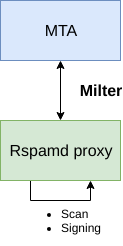
In this mode, the rspamd_proxy worker scans messages independently and communicates directly with the MTA using the Milter protocol. The advantage of this mode is its simplicity. Below is a sample configuration for this mode:
# local.d/worker-proxy.inc
upstream "local" {
  self_scan = yes; # Enable self-scan
}

# Proxy worker is listening on localhost:11332 by default
#bind_socket = localhost:11332;
Also you can disable1 normal worker to free up system resources as it is not necessary in self-scan mode:
# local.d/worker-normal.inc
enabled = false;
But there is a drawback: when rspamc connects to a remote host without a port, it sends scan requests to the normal worker port (11333), so you need to point it to the controller worker port (11334) explicitly:
rspamc -h rspamd.example.org:11334 input-file
This is not needed for local scans: when the host is localhost (the default), 127.0.0.1 or ::1 and no port is given, rspamc connects to the controller port (1.7+).
Proxy mode

In this mode, a dedicated layer of Rspamd scanners is employed, featuring load-balancing and optional encryption and/or compression. For this particular setup, the configuration may vary. Below is a concise example of proxy mode with four scanners, where two of them are allocated more resources to handle a higher volume of requests. Additionally, the shipped local upstream is disabled:
# local.d/worker-proxy.inc
upstream "local" {
  disabled = true;
}

upstream "scan" {
  default = yes;
  hosts = "round-robin:host1:11333:10,host2:11333:10,host3:11333:5,host4:11333:5";
  key = "..."; # Public key for encryption, generated by rspamadm keypair (optional)
  compression = yes; # Use zstd compression (optional)
  settings_id = "name"; # Apply a custom setting from the user settings module (optional)
}
Token bucket load balancing
Starting from Rspamd 4.0, the proxy can select upstream hosts with token bucket load balancing instead of round-robin. It is enabled for each upstream that has a token_bucket sub-block. The shipped local upstream in $CONFDIR/worker-proxy.inc has one, so token bucket is the default there; an upstream you define without this block uses round-robin.
Each host of the upstream has a bucket of max_tokens tokens. A request costs base_cost + message_size / scale tokens, where message_size is in bytes. The proxy sends the request to the host with the fewest tokens in flight among the hosts that have enough tokens left; if no host has enough, it picks the host with the fewest tokens in flight. The tokens are returned when the request succeeds. After a failure they are not returned, and the bucket refills over time at max_tokens / 60 tokens per second.
The token bucket behaviour is controlled per-upstream via the token_bucket sub-block:
# local.d/worker-proxy.inc
upstream "scan" {
  default = yes;
  hosts = "host1:11333,host2:11333";

  token_bucket {
    max_tokens = 10000; # bucket capacity per host (default: 10000)
    scale = 1024;       # message bytes per token (default: 1024)
    base_cost = 10;     # tokens charged per request on top of the size cost (default: 10)
  }
}
| Option | Default | Description |
|---|---|---|
max_tokens | 10000 | Bucket capacity of each host; also sets the refill rate (max_tokens / 60 per second) |
scale | 1024 | Message bytes per token |
base_cost | 10 | Tokens charged for every request in addition to the size-based cost |
min_tokens | 1 | Accepted (and set in the shipped config), but not used by the current selection code |
To use round-robin for an upstream, leave out the token_bucket block. For the shipped local upstream, which gets its block from $CONFDIR/worker-proxy.inc, set it to false in local.d/worker-proxy.inc:
# local.d/worker-proxy.inc
upstream "local" {
  token_bucket = false; # use round-robin
}
Alternatively, define the upstreams in override.d/worker-proxy.inc; its upstream section replaces the whole shipped one, including any upstreams from local.d/worker-proxy.inc:
# override.d/worker-proxy.inc
upstream "local" {
  default = yes;
  hosts = "localhost";
}
Mirroring

The proxy can be utilized for testing purposes, including:
- evaluating new versions of Rspamd
- testing new plugins
- validating new rules
- experimenting with configuration changes
- assessing ML models
In this mode, Rspamd mirrors a portion of its traffic to a test cluster. The scan results from the test cluster are disregarded when responding to clients. However, optional comparison scripts can be initiated to assess the mirrored results. Below is a sample configuration for this setup, with no utilization of milter mode in this example:
# local.d/worker-proxy.inc
# Main scan layer
upstream "scan" {
  default = yes;
  hosts = "round-robin:host1:11333:10,host2:11333:10,host3:11333:5,host4:11333:5";
  key = "..."; # Public key for encryption, generated by rspamadm keypair
  compression = yes; # Use zstd compression
}

mirror "test" {
  hosts = "test:11333";
  probability = 0.1; # Mirror 10% of traffic
  key = "..."; # Public key for encryption, generated by rspamadm keypair
  compression = yes; # Use zstd compression
}
User settings
The proxy worker can apply a specific setting using the settings_id configured in an upstream through the user settings module. Ensure that the user settings module includes a setting with the same name as defined in settings_id.
Compare scripts
Comparison scripts are designed for executing straightforward actions with the results obtained from a mirror and the main cluster machine. These scripts do not support asynchronous requests, so your options are limited to logging or writing to files. Below is a basic example of such a script in the configuration:
# local.d/worker-proxy.inc
  script =<<EOD
return function(results)
  local log = require "rspamd_logger"

  for k,v in pairs(results) do
    if type(v) == 'table' then
      log.infox("%s: %s", k, v['score'])
    else
      log.infox("err: %s: %s", k, v)
    end
  end
end
EOD;