Tool selection guide
Rspamd has several ways to add your own checks: multimap rules, composites, regexp rules, selectors, Lua rules and plugins. Use the simplest one that solves the problem. The diagram shows the order in which to consider them, and the rest of this page follows that order.
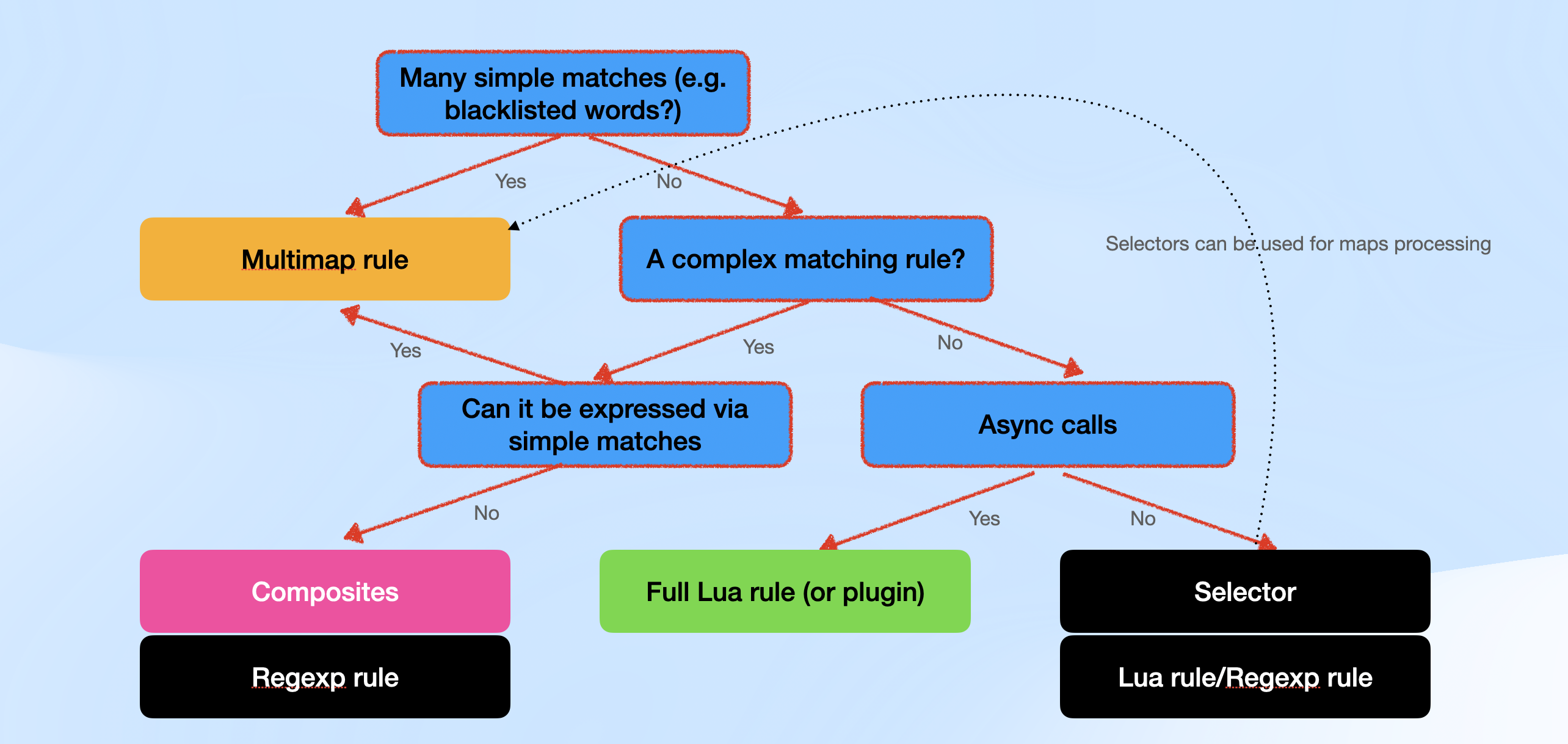
Decision order
- Is the check a set of many simple matches, such as a list of bad words, domains or IP addresses? Use a multimap rule.
- Is it a complex matching rule? If you can still express it with simple matches, use multimap. If you cannot, combine existing symbols with a composite or write a regexp rule.
- Does the check need asynchronous calls, such as HTTP, DNS or Redis requests? Use a built-in module if one already does the lookup; otherwise write a Lua rule or a plugin.
- Otherwise, use a selector or a short Lua or regexp rule. Selectors can also provide the values that a multimap rule looks up.
Multimap rules
The multimap module looks up message data in lists called maps. It can check sender and recipient addresses, IP addresses, header values, URLs, attachment file names and extensions (including the detected file type), and the message text. A map can be a local file, an HTTP URL or a Redis key. Rspamd reloads changed maps without a restart, so you can update a list without touching the rule.
# /etc/rspamd/local.d/multimap.conf

# Add score for sender domains listed in the map
BLOCKED_SENDERS {
  type = "from";
  filter = "email:domain";
  map = "${LOCAL_CONFDIR}/local.d/maps.d/blocked_domains.list";
  score = 8.0;
}

# Add score for text that matches a regular expression in the map
# (the map holds one regular expression per line, e.g. /\bwire transfer\b/i)
RISKY_KEYWORDS {
  type = "content";
  filter = "oneline";
  regexp = true;
  map = "${LOCAL_CONFDIR}/local.d/maps.d/risky_keywords.list";
  score = 3.0;
}
Some details of these two rules:
${LOCAL_CONFDIR}expands to/etc/rspamd(/usr/local/etc/rspamdon FreeBSD), so the first map is/etc/rspamd/local.d/maps.d/blocked_domains.list. Maps underlocal.dalso work with the Docker setup from the installation guide, which mounts only that directory.type = "from"checks the SMTP envelope sender and uses the From header only when there is no envelope sender. To check the From header instead, usetype = "header"; header = "From";or addextract_from = "mime";.filter = "email:domain"compares only the domain with the map. Without a filter, each map entry is compared with the full address, the domain and the local part, so an entry such asinfowould matchinfo@at any domain.- The score does not block mail unless the total score of the message reaches the reject threshold. With the default thresholds (add_header at 6, reject at 15), these 8 points on their own only add a header. To reject every matching message, replace
scorewithaction = "reject";. - A
contentrule needsregexp = true(orglob = true) and afilter. Without them, the whole raw message is compared with each map line as a plain string, so the rule matches only when the entire message equals a line.onelinematches the text of each text part with HTML tags and newlines removed. The other filters are described in map filters.
Complex rules: composites and regexp rules
When the logic cannot be reduced to list lookups, combine symbols that Rspamd already produces, or match regular expressions, optionally checking each match with a Lua function.
Composites
A composite adds a new symbol when a boolean expression over other symbols is true.
# /etc/rspamd/local.d/composites.conf
SUSPICIOUS_SENDER {
  expression = "RISKY_KEYWORDS & (BLOCKED_SENDERS | g+:dmarc)";
  score = 6.0;
  policy = "leave"; # keep the component symbols and their scores
}
g+:dmarc matches any symbol of the dmarc group that has a positive score. With the default scores these are DMARC_POLICY_REJECT, DMARC_POLICY_QUARANTINE, DMARC_POLICY_SOFTFAIL and BLACKLIST_DMARC (added by the whitelist module). A composite expression cannot match symbol names with a regular expression, so use group matchers or list the symbols explicitly.
A composite only adds a scored symbol. It does not set an action, and policy only decides whether the component symbols keep their scores. To force an action when a combination of symbols matches, use force_actions. To force an action whenever one multimap rule matches, use the multimap action option described above.
Regexp rules
A regexp rule combines regular expressions over headers, text parts, URLs, the raw message or selector output with logical operators (&&, ||, !) and the + operator with a comparison (A + B + C > 1 is true when at least two of the atoms match). The re_conditions table attaches a Lua function to a regular expression, and a match counts only when the function returns true. Use it for checks that a regular expression cannot do alone, such as a checksum. Keep the regular expressions themselves strict and bounded, with word boundaries and fixed repetition counts, so that they do not match more than you intend.
Because re_conditions are Lua functions, such a rule has to be written in Lua. Put it in /etc/rspamd/rspamd.local.lua or in any *.lua file in /etc/rspamd/lua.local.d/:
-- /etc/rspamd/rspamd.local.lua
local lua_util = require "lua_util"

local card_re = [[/\b\d{16}\b/{sa_body}]]

local function luhn_ok(digits)
  local sum, alt = 0, false
  for i = #digits, 1, -1 do
    local d = tonumber(digits:sub(i, i))
    if alt then
      d = d * 2
      if d > 9 then d = d - 9 end
    end
    sum = sum + d
    alt = not alt
  end
  return sum % 10 == 0
end

config['regexp']['MY_CARD_NUMBER'] = {
  re = card_re,
  re_conditions = {
    -- the key is the regexp atom exactly as written in `re`
    [card_re] = function(task, txt, s, e)
      return luhn_ok(lua_util.str_trim(txt:sub(s + 1, e)))
    end,
  },
  score = 2.0,
  description = 'Message contains a number that passes the card checksum',
  group = 'local',
}
{sa_body} matches the Subject and the decoded text parts, like a SpamAssassin body rule. The other match types are listed in regular expressions. The pattern is deliberately simple and only finds 16 digits written without separators.
For a rule with two regular expressions and two conditions, see rules/bitcoin.lua, which defines the built-in BITCOIN_ADDR symbol. Give your own rules new symbol names: assigning to an existing name such as BITCOIN_ADDR replaces the built-in rule.
Since Rspamd 4.1 you can also keep regexp rules in /etc/rspamd/lua.local.d/regexps/*.lua. Each such file returns a table that maps symbol names to rule definitions, as in the shipped example.lua.example. Plain regexp rules without Lua functions can also be written in UCL in /etc/rspamd/local.d/regexp.conf.
Async calls: Lua rules and plugins
Before you write Lua, check whether a module already does the lookup. Multimap reads Redis maps (redis:// and redis+selector://), rbl queries DNS blocklists, and antivirus and external_services send messages to scanners. Write Lua for an HTTP API or for logic that these modules cannot express.
Lua rules
A Lua rule registers a symbol with a callback. Put it in /etc/rspamd/rspamd.local.lua or in a *.lua file in /etc/rspamd/lua.local.d/:
-- /etc/rspamd/lua.local.d/my_rules.lua
local rspamd_http = require "rspamd_http"
local lua_util = require "lua_util"

rspamd_config:register_symbol({
  name = 'MY_ASYNC_CHECK',
  score = 2.0,
  group = 'local',
  description = 'External service flagged this message',
  callback = function(task)
    local url = 'https://example.com/check?id=' ..
        lua_util.url_encode_string(task:get_message_id())
    rspamd_http.request({
      url = url,
      task = task,
      timeout = 1.5,
      callback = function(err, code, body)
        if not err and code == 200 and body == 'bad' then
          task:insert_result('MY_ASYNC_CHECK', 1.0)
        end
      end,
    })
  end,
})
Passing task = task attaches the request to the task, so Rspamd waits for the reply (up to timeout) before it finishes the scan. The symbol callback returns at once and the result is inserted from the request callback. The Message-ID is URL-encoded because it can contain characters such as &, + and = that have a special meaning in a query string.
Do not call blocking functions such as io.popen, os.execute or a third-party socket library in a callback: the worker cannot process other messages until they return. See sync and async for the general model.
A Lua rule or a plugin can produce several symbols from one callback: register a type = 'callback' symbol and type = 'virtual' symbols with parent set to the ID that rspamd_config:register_symbol returned for the callback symbol, as mid.lua does.
Plugins
Write a plugin when the rule needs its own configuration section. Rspamd loads your own plugins from /etc/rspamd/plugins.d/, and the module name is the file name without .lua:
-- /etc/rspamd/plugins.d/my_plugin.lua
if confighelp then
  return
end

local lua_util = require "lua_util"

local N = 'my_plugin' -- must match the file name and the config section

local settings = {
  header = 'X-Flag',
  value = 'on',
}

local opts = rspamd_config:get_all_opt(N)
if not opts then
  lua_util.disable_module(N, 'config')
  return
end
settings = lua_util.override_defaults(settings, opts)

rspamd_config:register_symbol({
  name = 'MY_PLUGIN_SYMBOL',
  type = 'normal',
  score = 1.0,
  group = N,
  description = 'Configured header has the configured value',
  callback = function(task)
    if task:get_header(settings.header) == settings.value then
      task:insert_result('MY_PLUGIN_SYMBOL', 1.0)
    end
  end,
})
Rspamd enables the plugin only when the configuration has a top-level section with the same name. Declare it in /etc/rspamd/rspamd.conf.local:
# /etc/rspamd/rspamd.conf.local
my_plugin {
  header = "X-Flag";
  value = "on";
}
The same block, including the outer my_plugin { }, can go in /etc/rspamd/modules.local.d/my_plugin.conf instead (package installs only: Rspamd reads modules.local.d from the shipped configuration directory, which is /usr/share/rspamd/config in the Docker image, so use rspamd.conf.local there).
Rspamd does not read local.d/my_plugin.conf on its own for a plugin it does not ship. To use the usual local.d/override.d layout, replace the block above with the following one, which includes those files, and put the options, without the outer my_plugin { }, in /etc/rspamd/local.d/my_plugin.conf:
# /etc/rspamd/rspamd.conf.local
my_plugin {
  .include(try=true; priority=1; duplicate=merge) "$LOCAL_CONFDIR/local.d/my_plugin.conf"
  .include(try=true; priority=10) "$LOCAL_CONFDIR/override.d/my_plugin.conf"
}
Run rspamadm configdump -m to check the result: the plugin must be listed under "Modules enabled", not under "Modules disabled (unconfigured)".
Simple rules without async calls
Selectors
A selector extracts a value from the message and optionally transforms it. A multimap rule with type = "selector" looks the result up in a map, which covers data that the other multimap types do not extract. For example, to score attachments whose SHA-256 digest is on a list:
# /etc/rspamd/local.d/multimap.conf
BAD_ATTACHMENT_HASH {
  type = "selector";
  selector = "attachments('hex', 'sha256')";
  map = "${LOCAL_CONFDIR}/local.d/maps.d/bad_attachment_hashes.list";
  score = 10.0;
}
The selector returns the digest of each attachment's decoded content in lowercase hex, the same value that sha256sum prints for the saved file. Put one digest per line in the map.
Regexp rules can match selector output too: register the selector with rspamd_config:register_re_selector in /etc/rspamd/rspamd.local.lua and use it as name=/regexp/{selector}, as described in regular expressions selectors.
Short Lua and regexp rules
When no selector fits, write a regexp rule, or a Lua rule like the async example without the HTTP request: in the callback, call task:insert_result or return true to add the symbol.
File locations
| Tool | Where it goes |
|---|---|
| Multimap rule | /etc/rspamd/local.d/multimap.conf |
| Composite | /etc/rspamd/local.d/composites.conf |
| Regexp rule | /etc/rspamd/rspamd.local.lua or /etc/rspamd/lua.local.d/*.lua; since 4.1 also /etc/rspamd/lua.local.d/regexps/*.lua; plain UCL rules in /etc/rspamd/local.d/regexp.conf |
| Lua rule | /etc/rspamd/rspamd.local.lua or /etc/rspamd/lua.local.d/*.lua |
| Plugin | Code in /etc/rspamd/plugins.d/<name>.lua, settings in a <name> { } section in /etc/rspamd/rspamd.conf.local or, with packages only, /etc/rspamd/modules.local.d/<name>.conf |
| Selector | Inside the rule that uses it, for example a multimap rule with type = "selector"; selectors for regexp rules are registered with rspamd_config:register_re_selector in /etc/rspamd/rspamd.local.lua |
Next steps
- Writing rules for Lua rules and plugins in more depth
- Multimap guide and selectors
- After getting started for the rest of the documentation